

Summary
NOTE (added in November 2001): A childrens DVD published by Warner Bros Home Video called "Powerpuff Girls Meet the Beat Alls" was shipped with a copy of this virus. Funlove had infected the autostart file of the DVD, so a computer become infected automatically once the DVD was inserted. Warner recalled the DVD.
Removal
Based on the settings of your F-Secure security product, it will either move the file to the quarantine where it cannot spread or cause harm, or remove it.
A False Positive is when a file is incorrectly detected as harmful, usually because its code or behavior resembles known harmful programs. A False Positive will usually be fixed in a subsequent database update without any action needed on your part. If you wish, you may also:
- Check for the latest database updates
- First, check if your F-Secure security program is using the latest updates, then try scanning the file again.
- Submit a sample
- After checking, if you still believe the file is incorrectly detected, you can submit a sample of it for re-analysis.
- Note: If the file was moved to quarantine, you need to collect the file from quarantine before you can submit it.
- Exclude a file from further scanning
- If you are certain that the file is safe and want to continue using it, you can exclude it from further scanning by the F-Secure security product.
- Note: You need administrative rights to change the settings.
Technical Details
FunLove is a memory resident Win32 virus. It was found in the wild in several countries in November 1999 - including US, UK and Czech Republic.
Funlove is not encrypted or polymorphic. The virus infects PE EXE (Windows portable executables) on local and network drives. The virus itself is in a format of a PE executable file with a single file section '.code'.
When an infected file is run, the virus creates FLCSS.EXE file in the Windows system directory, writes its pure code there and then runs the generated file. This file becomes virus dropper - it is started by the virus as a hidden Windows application (under Win9x) or as a service (under WinNT).
In case an error occurrs while creating the FLCSS.EXE dropper file the virus runs its infection routine from its instance in the infected host file. The infection routine is run in the background as a separate thread and as a result the host program is executed with no visible delays.
The infection routine scans all local drives from C: to Z:, then looks for network resources, scans subdirectory trees there and infects PE files that have .OCX, .SCR or .EXE extensions. While infecting a file the virus writes its code to the end of the file - to the last file section and patches file's startup routine with a 8 byte long code that passes control to virus body. Being activated the virus restores these 8 bytes first and then starts its main code.
The virus is only able to infect PE files on network resources that the current infected workstation user has write access to. This limits spreading of a virus considerably.
Upon infection the virus checks file names and does not infect files that have one of the following 4 letters in the beginning of their names:
ALER AMON _AVP AVP3 AVPM F-PR NAVW SCAN SMSS DDHE DPLA MPLA The virus also patches the NTLDR and WINNT\System32\ntoskrnl.exe files the similar way Bolzano virus does. The patched files are not recoverable and should be restored from backup.
The virus does not have any payload. It contains the following text string:
~Fun Loving Criminal~ 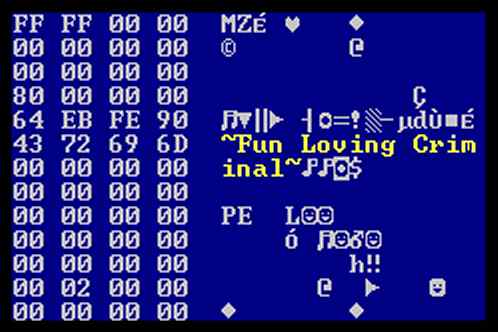
This text string is located where the usual DOS stub text 'This program cannot be run in DOS mode.' should be. When the virus dropper is started from DOS it outputs its message and restarts the system.Disinfection of Funlove:
Disinfection of Funlove requires removing the virus from all disinfectable files with F-Secure Anti-Virus and renaming or deleting of all locked or non-disinfectable files including Funlove dropper FLCSS.EXE file. To be able to disinfect or delete locked files, you have to exit to pure DOS and clean a system with a DOS version of F-Prot or AVP. Or in case of Windows NT, you have to rename the file(s) with a non-executable extension (for example *.EX1) and restart a system.
In all cases FLCSS.EXE file and all non-disinfectable files should be deleted or renamed before Windows is started next time or a system will be re-infected.
If infection is in a network, you could protect clean systems with F-Secure's Anti-Funlove utility:
[link removed]
and then disinfect all infected workstations separately. Note that GateKeeper/OAS setting should be set to 'Disinfect Automatically' when infection is in a network and it's not possible to take it down. But it is advised to take network down during disinfection as Funlove will try to spread from infected to clean systems via network. Our utility should stop it from doing that, but it's safer to disinfect when network is not functioning.
Note that a system should be clean before the utility can be installed.
Also as the virus patches the \NTLDR and WINNT\System32\ntoskrnl.exe files to disable NT's security the patched files should be restored from a backup.
Protect your devices from malware with F‑Secure Total
Protecting your devices from malicious software is essential for maintaining online security. F‑Secure Total makes this easy, helping you to secure your devices in a brilliantly simple way.
- Award‑winning antivirus and malware protection
- Online browsing, banking, and shopping protection
- 24/7 online identity and data breach monitoring
- Unlimited VPN service to safeguard your privacy
- Password manager with private data protection
Choose how many devices you want to protect to get started.

- Free customer support
- Cancel anytime
- The trial does not obligate you to buy the product
After 30 days your subscription will renew automatically for one year at €69.99.


More Support
Community
Ask questions in our Community.
User guides
Check the user guide for instructions.
Contact Support
Chat with our support for assistance.
Submit a Sample
Submit a file or URL for analysis.